Prerequisites: ch154 (matrix multiplication), ch164–ch168 (linear transformations, rotation, scaling, projection), ch173 (SVD), ch185 (matrix transformation playground — 2D) Part VI Project — Linear Algebra (chapters 151–200) Difficulty: Intermediate | Estimated time: 60–90 minutes Output: A 3D transformation pipeline: Euler rotations, homogeneous coordinates for affine transforms, camera projection, and a simple scene renderer
0. Overview
Problem Statement
Computer graphics, robotics, and 3D data processing all require the same fundamental operation: describing positions and orientations in 3D space and transforming them via matrix multiplication.
The key insight: a homogeneous matrix can encode rotation, scaling, and translation in a single matrix multiply — making compositions of transformations trivial. The same mathematics governs a robot’s joint transforms, a camera’s view matrix, and a game engine’s scene graph.
Concepts Used
3D rotation matrices: Rx, Ry, Rz (extends ch166)
Composition of transformations via matrix multiplication (ch154)
Homogeneous coordinates: lifting for affine maps
Perspective projection: a rank-1 update to the transform pipeline
SVD as a decomposition of general 3D deformations (ch173)
Expected Output
3D rotation matrices: Rx, Ry, Rz and their composition
Homogeneous transform pipeline: translation + rotation + scaling in one matrix
Perspective projection: 3D → 2D
Scene rendering: a 3D wireframe cube under user-specified transforms
Gimbal lock demonstration — the failure mode of Euler angles
1. Setup
import numpy as np
import matplotlib.pyplot as plt
from mpl_toolkits.mplot3d import Axes3D
from mpl_toolkits.mplot3d.art3d import Poly3DCollection

plt.style.use('seaborn-v0_8-whitegrid')

# ---------------------------------------------------------------
# Reference geometry: a unit cube centered at origin,
# a coordinate frame (axis arrows), and a simple 3D mesh.
# ---------------------------------------------------------------

def cube_vertices():
    """
    8 vertices of a unit cube centered at origin.
    Returns: shape (3, 8), each column is a vertex [x, y, z].
    """
    return np.array([
        [-1,-1,-1], [-1,-1, 1], [-1, 1,-1], [-1, 1, 1],
        [ 1,-1,-1], [ 1,-1, 1], [ 1, 1,-1], [ 1, 1, 1]
    ]).T   # shape (3, 8)


CUBE_VERTICES = cube_vertices()

# Cube edges: pairs of vertex indices
CUBE_EDGES = [
    (0,1),(0,2),(0,4),(1,3),(1,5),(2,3),(2,6),(3,7),
    (4,5),(4,6),(5,7),(6,7)
]

# Cube faces (for filled rendering)
CUBE_FACES = [
    [0,1,3,2], [4,5,7,6],   # left/right
    [0,1,5,4], [2,3,7,6],   # bottom/top
    [0,2,6,4], [1,3,7,5],   # front/back
]

print(f"Cube: {CUBE_VERTICES.shape[1]} vertices, {len(CUBE_EDGES)} edges, {len(CUBE_FACES)} faces")
Cube: 8 vertices, 12 edges, 6 faces
2. Stage 1 — 3D Rotation Matrices
In 2D, there is only one rotation axis (the z-axis out of the plane). In 3D, we can rotate about any axis. The three elementary rotations:
Each is orthogonal (, ).
# --- Stage 1: 3D Rotation Matrices ---

def Rx(theta):
    """Rotation about x-axis by angle theta (radians)."""
    c, s = np.cos(theta), np.sin(theta)
    return np.array([[1, 0,  0],
                     [0, c, -s],
                     [0, s,  c]])

def Ry(theta):
    """Rotation about y-axis by angle theta (radians)."""
    c, s = np.cos(theta), np.sin(theta)
    return np.array([[ c, 0, s],
                     [ 0, 1, 0],
                     [-s, 0, c]])

def Rz(theta):
    """Rotation about z-axis by angle theta (radians)."""
    c, s = np.cos(theta), np.sin(theta)
    return np.array([[c, -s, 0],
                     [s,  c, 0],
                     [0,  0, 1]])


# Verify orthogonality
for name, R_fn in [('Rx', Rx), ('Ry', Ry), ('Rz', Rz)]:
    R = R_fn(np.pi / 3)
    err_ortho = np.linalg.norm(R.T @ R - np.eye(3))
    det_val   = np.linalg.det(R)
    print(f"{name}(60°): ||R^T R - I|| = {err_ortho:.2e},  det = {det_val:.6f}")


# --- Rotation composition is not commutative ---
ALPHA = np.pi / 4   # 45° x-rotation
BETA  = np.pi / 3   # 60° y-rotation

R1 = Rx(ALPHA) @ Ry(BETA)   # x first, then y
R2 = Ry(BETA) @ Rx(ALPHA)   # y first, then x

print(f"\nRx(45°) @ Ry(60°):\n{np.round(R1, 4)}")
print(f"\nRy(60°) @ Rx(45°):\n{np.round(R2, 4)}")
print(f"\nAre they equal? {np.allclose(R1, R2)}")
print(f"Max difference: {np.abs(R1 - R2).max():.4f}")
Rx(60°): ||R^T R - I|| = 2.10e-17, det = 1.000000
Ry(60°): ||R^T R - I|| = 2.10e-17, det = 1.000000
Rz(60°): ||R^T R - I|| = 2.10e-17, det = 1.000000
Rx(45°) @ Ry(60°):
[[ 0.5 0. 0.866 ]
[ 0.6124 0.7071 -0.3536]
[-0.6124 0.7071 0.3536]]
Ry(60°) @ Rx(45°):
[[ 0.5 0.6124 0.6124]
[ 0. 0.7071 -0.7071]
[-0.866 0.3536 0.3536]]
Are they equal? False
Max difference: 0.6124
# --- Visualize cube under various rotations ---

def draw_cube(ax, vertices_3d, title='', color='steelblue', alpha=0.15):
    """
    Draw a 3D wireframe cube.

    Args:
        ax:          matplotlib 3D axes
        vertices_3d: shape (3, 8)
        title:       subplot title
    """
    # Draw edges
    for i, j in CUBE_EDGES:
        xs = [vertices_3d[0, i], vertices_3d[0, j]]
        ys = [vertices_3d[1, i], vertices_3d[1, j]]
        zs = [vertices_3d[2, i], vertices_3d[2, j]]
        ax.plot(xs, ys, zs, color=color, lw=1.5, alpha=0.8)

    # Draw faces
    face_verts = [[vertices_3d[:, idx].tolist() for idx in face]
                  for face in CUBE_FACES]
    poly = Poly3DCollection(face_verts, alpha=alpha,
                             facecolor=color, edgecolor='none')
    ax.add_collection3d(poly)

    # Draw coordinate axes (for the transformed frame)
    origin = np.zeros(3)
    for axis, col in [(np.array([1.5,0,0]),'red'),
                      (np.array([0,1.5,0]),'green'),
                      (np.array([0,0,1.5]),'blue')]:
        ax.quiver(*origin, *axis, color=col, arrow_length_ratio=0.2, lw=2)

    ax.set_xlim(-2, 2)
    ax.set_ylim(-2, 2)
    ax.set_zlim(-2, 2)
    ax.set_xlabel('x')
    ax.set_ylabel('y')
    ax.set_zlabel('z')
    ax.set_title(title, fontsize=9)


rotations = [
    (np.eye(3),              'Identity'),
    (Rx(np.pi/4),            'Rx(45°)'),
    (Ry(np.pi/3),            'Ry(60°)'),
    (Rz(np.pi/6),            'Rz(30°)'),
    (Rx(np.pi/4)@Ry(np.pi/4),'Rx(45°)@Ry(45°)'),
    (Ry(np.pi/4)@Rx(np.pi/4),'Ry(45°)@Rx(45°)'),
]

fig = plt.figure(figsize=(18, 8))
colors = plt.cm.tab10(np.arange(len(rotations)))

for i, (R, name) in enumerate(rotations):
    ax = fig.add_subplot(2, 3, i+1, projection='3d')
    verts_t = R @ CUBE_VERTICES
    draw_cube(ax, CUBE_VERTICES, title='', color='lightgray', alpha=0.05)
    draw_cube(ax, verts_t, title=name, color=colors[i], alpha=0.2)

plt.suptitle('3D Rotation Matrices — Cube Transformations\n(gray=original, colored=transformed)',
             fontsize=12)
plt.tight_layout()
plt.show()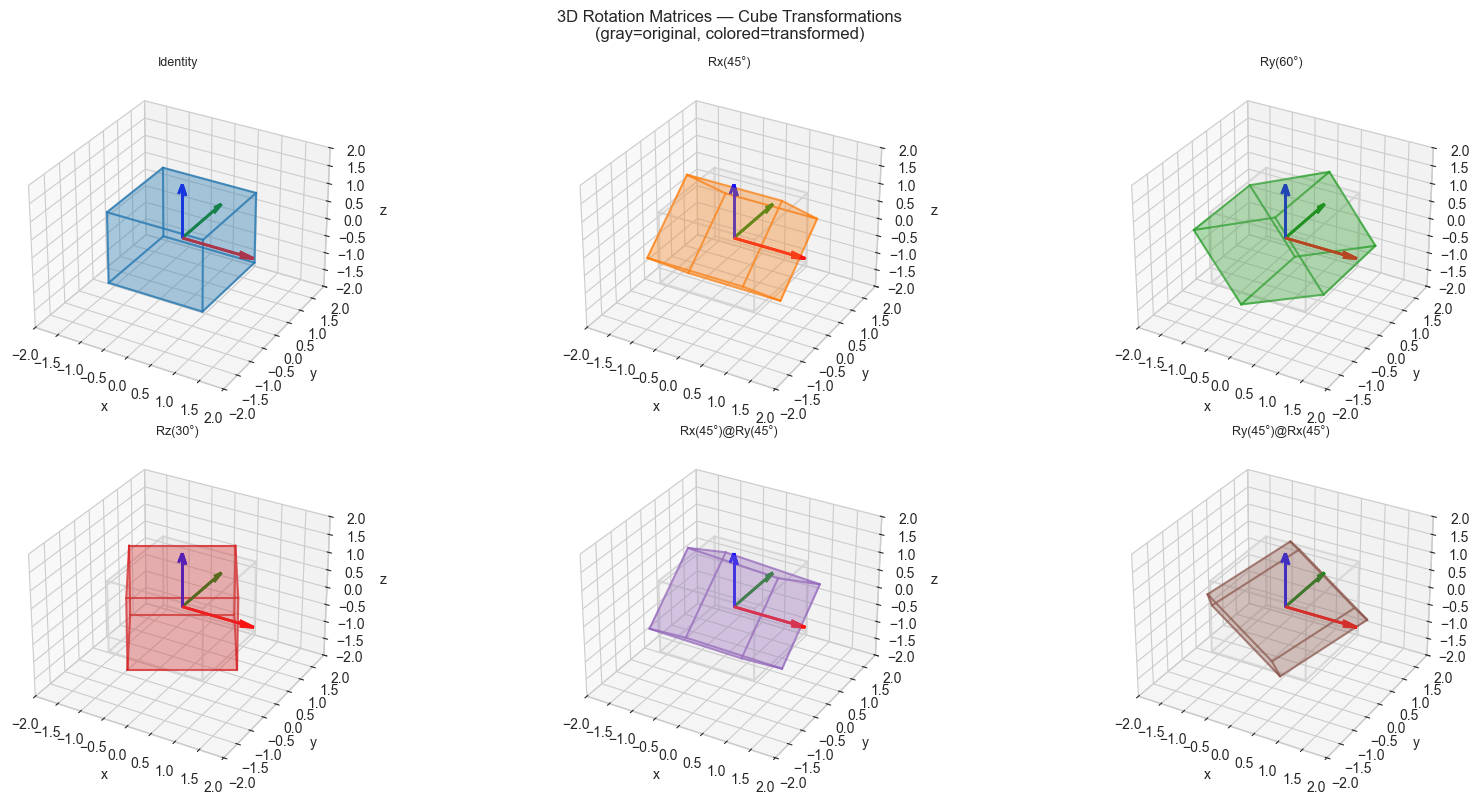
3. Stage 2 — Homogeneous Coordinates and Affine Transforms
Pure rotation matrices cannot represent translation () as a matrix multiplication — translation is affine, not linear.
The fix: lift points to 4D by appending a 1: .
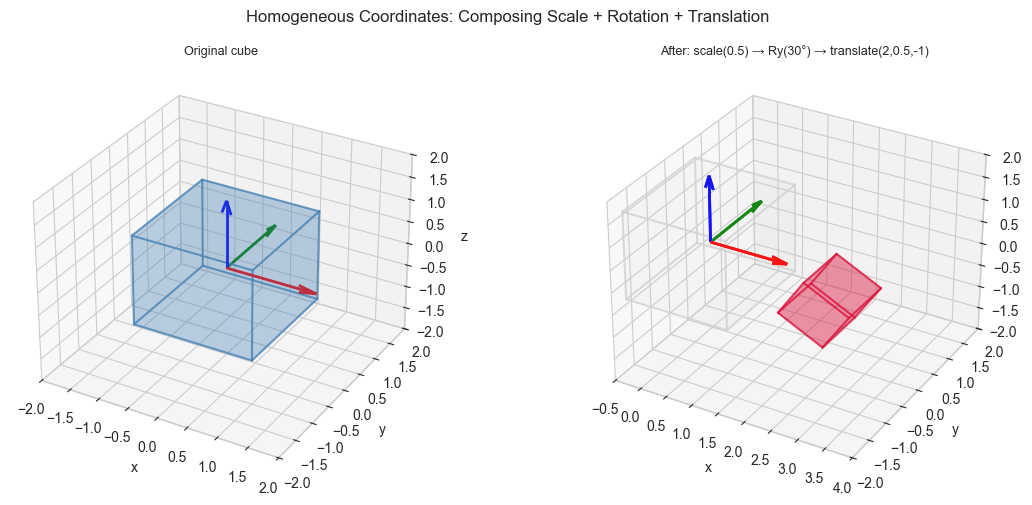
Then translation, rotation, and scaling all fit into a matrix:
Composing transforms is just matrix multiplication: .
# --- Stage 2: Homogeneous Transform Pipeline ---

def make_transform(R=None, t=None, s=None):
    """
    Build a 4x4 homogeneous transformation matrix.

    T = [[s*R, t],
         [0,   1]]

    Args:
        R: 3x3 rotation matrix (default: identity)
        t: translation vector, shape (3,) (default: zero)
        s: uniform scale factor (default: 1)

    Returns:
        T: 4x4 homogeneous matrix
    """
    R = np.eye(3) if R is None else R
    t = np.zeros(3) if t is None else t
    s = 1.0 if s is None else s

    T = np.eye(4)
    T[:3, :3] = s * R
    T[:3,  3] = t
    return T


def apply_homogeneous(T, pts_3d):
    """
    Apply a 4x4 homogeneous transform to 3D points.

    Args:
        T:      4x4 homogeneous matrix
        pts_3d: 3D points, shape (3, N)

    Returns:
        Transformed 3D points, shape (3, N)
    """
    N = pts_3d.shape[1]
    pts_h = np.vstack([pts_3d, np.ones((1, N))])   # (4, N)
    pts_t = T @ pts_h                               # (4, N)
    return pts_t[:3] / pts_t[3]                     # dehomogenize


# Build a complex transform: scale → rotate → translate
T_scale  = make_transform(s=0.5)
T_rotate = make_transform(R=Ry(np.pi/6))
T_trans  = make_transform(t=np.array([2.0, 0.5, -1.0]))

# Compose: scale first, then rotate, then translate
# Note: apply right to left — T_trans @ T_rotate @ T_scale
T_composed = T_trans @ T_rotate @ T_scale

print("Composed transform (scale→rotate→translate):")
print(np.round(T_composed, 4))

# Apply to cube
CUBE_T = apply_homogeneous(T_composed, CUBE_VERTICES)

fig = plt.figure(figsize=(12, 5))

ax1 = fig.add_subplot(121, projection='3d')
draw_cube(ax1, CUBE_VERTICES, title='Original cube', color='steelblue', alpha=0.2)

ax2 = fig.add_subplot(122, projection='3d')
draw_cube(ax2, CUBE_VERTICES, title='', color='lightgray', alpha=0.05)
draw_cube(ax2, CUBE_T, title='After: scale(0.5) → Ry(30°) → translate(2,0.5,-1)',
          color='crimson', alpha=0.25)
ax2.set_xlim(-0.5, 4)
ax2.set_ylim(-2, 2)
ax2.set_zlim(-2, 2)

plt.suptitle('Homogeneous Coordinates: Composing Scale + Rotation + Translation', fontsize=12)
plt.tight_layout()
plt.show()

# Verify: the inverse transform should recover the original
T_inv    = np.linalg.inv(T_composed)
CUBE_rec = apply_homogeneous(T_inv, CUBE_T)
print(f"\nRoundtrip error: {np.abs(CUBE_rec - CUBE_VERTICES).max():.2e}")
Composed transform (scale→rotate→translate):
[[ 0.433 0. 0.25 2. ]
[ 0. 0.5 0. 0.5 ]
[-0.25 0. 0.433 -1. ]
[ 0. 0. 0. 1. ]]
Roundtrip error: 4.44e-16
4. Stage 3 — Perspective Projection: 3D to 2D
# --- Stage 3: Perspective Projection ---
#
# A pinhole camera at the origin looks down the +z axis.
# A 3D point [X, Y, Z] projects to image coordinates:
#     x_img = f * X / Z
#     y_img = f * Y / Z
# where f is the focal length.
#
# In homogeneous form, this is a 3x4 matrix (projection matrix P):
#     [f  0  0  0]
# P = [0  f  0  0]
#     [0  0  1  0]
#
# After multiplying, divide by the third homogeneous coordinate.

def perspective_project(pts_3d, focal_length=2.0):
    """
    Project 3D points onto a 2D image plane using perspective projection.

    Args:
        pts_3d:       3D points, shape (3, N)
        focal_length: focal length parameter f

    Returns:
        pts_2d: 2D image coordinates, shape (2, N)
    """
    f = focal_length
    P = np.array([[f, 0, 0, 0],
                  [0, f, 0, 0],
                  [0, 0, 1, 0]])
    N = pts_3d.shape[1]
    pts_h = np.vstack([pts_3d, np.ones((1, N))])   # (4, N)
    img_h = P @ pts_h                               # (3, N)
    pts_2d = img_h[:2] / img_h[2]                  # divide by depth
    return pts_2d


def draw_cube_2d(ax, pts_2d, title='', color='steelblue'):
    """Draw cube wireframe from 2D projected vertices."""
    for i, j in CUBE_EDGES:
        ax.plot([pts_2d[0, i], pts_2d[0, j]],
                [pts_2d[1, i], pts_2d[1, j]],
                color=color, lw=1.5)
    ax.scatter(*pts_2d, s=20, color=color, zorder=5)
    ax.set_aspect('equal')
    ax.set_title(title, fontsize=10)
    ax.set_xlabel('x (image)')
    ax.set_ylabel('y (image)')


# Place cube 5 units in front of camera, then rotate it
CUBE_WORLD = CUBE_VERTICES.copy().astype(float)
CUBE_WORLD[2] += 5.0   # translate cube along z (away from camera)

# Try different viewing angles
view_angles = [
    (np.eye(3), 'Frontal view'),
    (Ry(np.pi/6), 'Ry(30°)'),
    (Ry(np.pi/4), 'Ry(45°)'),
    (Rx(np.pi/6) @ Ry(np.pi/4), 'Rx(30°) @ Ry(45°)'),
]

fig, axes = plt.subplots(1, 4, figsize=(16, 4))
colors = plt.cm.tab10(np.arange(4))

for ax, (R, title), col in zip(axes, view_angles, colors):
    # Rotate the cube (or equivalently, rotate the camera)
    CUBE_ROT = R @ CUBE_WORLD
    CUBE_2D  = perspective_project(CUBE_ROT, focal_length=2.0)
    draw_cube_2d(ax, CUBE_2D, title=title, color=col)
    ax.set_xlim(-1.5, 1.5)
    ax.set_ylim(-1.5, 1.5)
    ax.axhline(0, color='gray', lw=0.5)
    ax.axvline(0, color='gray', lw=0.5)

plt.suptitle('Perspective Projection: 3D Cube → 2D Image', fontsize=12)
plt.tight_layout()
plt.show()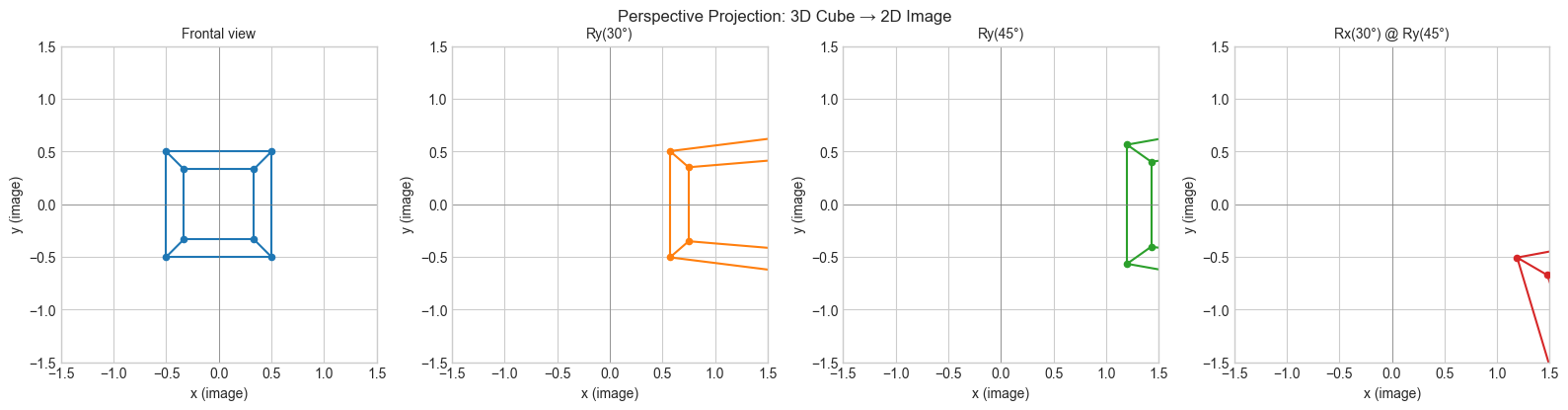
5. Stage 4 — Gimbal Lock: The Failure Mode of Euler Angles
# --- Stage 4: Gimbal Lock ---
#
# Euler angles: represent any rotation as three sequential single-axis rotations.
# Problem: when the middle rotation is +/-90 degrees, the first and third rotations
# collapse to the same axis — one degree of freedom is lost.
# This is "gimbal lock" — famous from the Apollo guidance computer.
#
# Hypothesis: rotating with Ry(90°) causes the x and z rotations to become equivalent.

def euler_to_matrix(alpha, beta, gamma):
    """
    Compose Euler angles (ZYX convention): Rz(alpha) @ Ry(beta) @ Rx(gamma)

    Args:
        alpha, beta, gamma: rotation angles in radians

    Returns:
        Combined 3x3 rotation matrix
    """
    return Rz(alpha) @ Ry(beta) @ Rx(gamma)


# Demonstrate gimbal lock: fix beta = pi/2
BETA_GIMBAL = np.pi / 2   # 90 degrees — the critical angle

fig, axes = plt.subplots(2, 4, figsize=(16, 8))

# Row 0: normal rotation (beta = 45°)
# Row 1: gimbal lock (beta = 90°)
alpha_vals = [0, np.pi/6, np.pi/3, np.pi/2]
betas      = [np.pi/4, BETA_GIMBAL]

for row, beta_test in enumerate(betas):
    for col, alpha in enumerate(alpha_vals):
        R_euler = euler_to_matrix(alpha=alpha, beta=beta_test, gamma=0)
        CUBE_E = R_euler @ CUBE_VERTICES

        ax = axes[row, col]
        CUBE_2D = perspective_project(CUBE_E + np.array([[0],[0],[5]]), focal_length=2.0)
        draw_cube_2d(ax, CUBE_2D,
                     title=f'β={np.degrees(beta_test):.0f}° α={np.degrees(alpha):.0f}°',
                     color='steelblue' if row==0 else 'crimson')
        ax.set_xlim(-1.5, 1.5)
        ax.set_ylim(-1.5, 1.5)

axes[0, 0].set_title(f'β=45° (no gimbal lock)\nα={np.degrees(alpha_vals[0]):.0f}°', fontsize=9)

plt.suptitle('Gimbal Lock: When β=90°, varying α has the same effect as varying γ\n'
             '(top: normal; bottom: locked — rotation is constrained to one plane)',
             fontsize=11)
plt.tight_layout()
plt.show()

# Numerical confirmation: at beta=90, Rz(alpha) @ Ry(90) @ Rx(gamma)
# only depends on (alpha - gamma)
print("\nGimbal lock numerical check:")
print("At β=90°, R(α=30°, β=90°, γ=0°) should equal R(α=0°, β=90°, γ=-30°):")
R1 = euler_to_matrix(np.pi/6, np.pi/2, 0)
R2 = euler_to_matrix(0,       np.pi/2, -np.pi/6)
print(f"Max difference: {np.abs(R1 - R2).max():.2e}  (should be ~0)")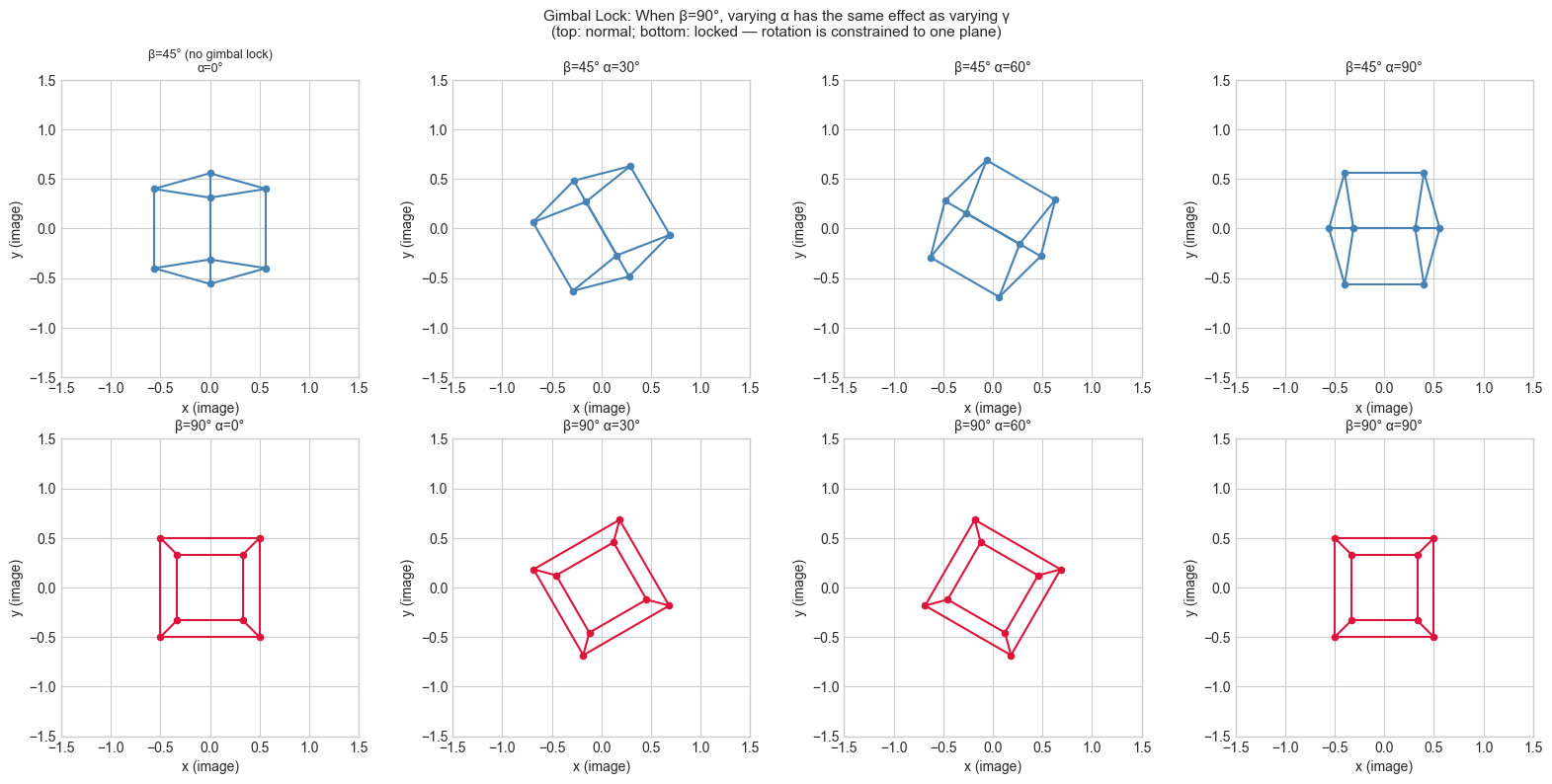
Gimbal lock numerical check:
At β=90°, R(α=30°, β=90°, γ=0°) should equal R(α=0°, β=90°, γ=-30°):
Max difference: 3.06e-17  (should be ~0)
6. Results & Reflection
What Was Built
A complete 3D transformation toolkit:
Elementary rotation matrices Rx, Ry, Rz — all orthogonal with determinant 1
Homogeneous coordinates: a matrix encoding rotation + scale + translation in one multiply
Perspective projection: the projection matrix that maps 3D world coordinates to 2D image coordinates
A 3D wireframe cube rendered from multiple viewpoints
Gimbal lock: the algebraic reason why Euler angles lose a degree of freedom at
Core Insights
| Concept | What it reveals |
|---|---|
| Orthogonality of R | Rotations preserve lengths and angles: |
| Homogeneous coordinates | Translation is linear in augmented space — compose everything as matmuls |
| Perspective divide by Z | Closer objects appear larger — depth modulates the scale |
| Gimbal lock | Euler angles are not a smooth parameterization: quaternions solve this |
Extension Challenges
1. Quaternion rotation.
Quaternions with represent rotations without gimbal lock.
Implement quaternion multiplication and quaternion_to_matrix. Verify that quaternion
interpolation (slerp) produces smoother paths than Euler interpolation.
2. Full rendering pipeline. Extend the perspective projection to a complete view frustum: model matrix → view matrix → projection matrix → viewport transform. Render a more complex object (tetrahedron, Stanford bunny point cloud) and implement backface culling using dot products with surface normals.
3. Camera calibration basics. Given a set of known 3D points and their 2D projections, recover the camera intrinsic matrix and rotation/translation. This is the Direct Linear Transform (DLT) algorithm — it is a least-squares problem (ch182) with an SVD solution (ch173).
Summary & Connections
3D rotation matrices are orthogonal (, ). They form the special orthogonal group SO(3). Composition by matrix multiplication is not commutative (ch154).
Homogeneous coordinates embed so that affine maps (translation + linear) become linear in the augmented space. This unifies the entire transform pipeline into a single matmul (ch154, ch164).
Perspective projection is a linear map in homogeneous coordinates followed by a division by depth. The resulting non-linearity in Cartesian coordinates gives the visual effect of foreshortening.
Gimbal lock is not a software bug — it is an intrinsic singularity of the Euler angle parameterization. Quaternions and rotation matrices do not have this problem.
This project reappears in:
ch119 (Geometry in Game Development) — applies this exact pipeline in the context of game engines and scene graphs.
ch278 (Feature Engineering) — 3D pose features for human motion data use the same rotation matrix representation.
ch187 (Project: Face Recognition PCA) — face images are 2D projections of 3D objects; understanding this projection helps interpret what PCA captures.